
服务端SDK接入指南
服务端SDK接入指南
1.概览
使用 Multiverse 服务需要在您的游戏服务器中集成 Multiverse 服务端SDK,以便于平台获取、更新服务器状态。 目前支持的语言和平台如下:
- Unity
- Unreal
- C#
- Go
此外,还可以使用 REST API 的方式与 Multiverse 平台进行交互。
2. 功能与生命周期
以下流程图的蓝色部分是您的游戏服务端集成时需要使用 SDK 与 Multiverse 平台交互的部分。
Ready()
此方法向 Multiverse 通知游戏服务器处于 Ready 状态。游戏服务器处于 Ready 状态后才可以被配。
Health()
此方法向 Multiverse 平台发送一个心跳包表明服务器处于活跃状态。如果连续若干次未检测到 health() 心跳包,服务器所在的容器会被标记为 Unhealthy 状态。 (不需要程序主动调用此方法,该方法会在程序成功连接multiverse sdk之后自动调用。)
Shutdown()
此方法通知 Multiverse 平台关闭游戏服务器。服务器的状态被置位 Shutdown 并且其所在的容器会被关闭
3. 本地开发与测试
服务端SDK默认需要在Multiverse服务器中才可以交互,为方便在本地开发和测试,您可以下载使用 sdkserver 在本地环境模拟平台端接收消息。 压缩包内含有 Linux , Windows 以及 MacOS 的可执行文件。下载解压后,请使用以下命令运行本地sdkserver:
- MacOS
./sdk-server.darwin.amd64 --local- Linux
./sdk-server.linux.amd64 --local- Windows
./sdk-server.windows.amd64.exe --local通过 -h 或者 --help 参数获取更多帮助信息。运行后,您可以正常启动自己的服务端程序来进行开发测试。
4. 操作指南
1. 安装配置 UOS Launcher
参考 Launcher 教程,安装 Launcher 后,关联 UOS APP, 开启 Multiverse 服务并安装 Multiverse SDK。
注意: 请务必确认在进行后续教程之前,已经成功完成了 Launcher 教程的安装步骤,否则可能导致后续接入无法顺利进行。
2. 核心类&接口
public interface IMultiverseSDK
{
    /// <summary>
    /// 标记 game server 为 ready 状态
    /// </summary>
    /// <exception cref="MultiverseSDKException"> 可查看具体errCode 和 message判断异常原因</exception>
    public Task ReadyAsync();

    /// <summary>
    /// 获取启动配置里配置的静态环境变量以及Allocation借口动态传入的变量(舰队模式Allocation接口传入的变量需等到game server status 为 allocated方可获取到)
    /// </summary>
    /// <exception cref="MultiverseSDKException"> 可查看具体errCode 和 message判断异常原因</exception>
    /// <returns>环境变量 Dictionary</returns>
    public Task<Dictionary<string, string>> GetAllocationEnvsAsync();

    /// <summary>
    /// 获取服务器基础配置信息,如AppId, AllocationId, Ip等信息
    /// </summary>
    /// <exception cref="MultiverseSDKException"> 可查看具体errCode 和 message判断异常原因</exception>
    /// <returns>服务器基础配置信息</returns>
    public Task<ServerInfo> GetServerInfoAsync();

    /// <summary>
    /// 获取 game server过期时间戳
    /// </summary>
    /// <exception cref="MultiverseSDKException"> 可查看具体errCode 和 message判断异常原因</exception>
    /// <returns>game server过期时间戳</returns>
    public Task<long> GetExpireAtAsync();

    /// <summary>
    /// 关闭 game server
    /// </summary>
    /// <exception cref="MultiverseSDKException"> 可查看具体errCode 和 message判断异常原因</exception>
    public Task ShutdownAsync();

    /// <summary>
    /// 舰队模式下,可通过该方法分配 game server
    /// </summary>
    /// <exception cref="MultiverseSDKException"> 可查看具体errCode 和 message判断异常原因</exception>
    public Task AllocateAsync();

    /// <summary>
    /// watch game server,舰队模式下可通过使用该方法watch game server 直到其 status 为allocated
    /// </summary>
    /// <exception cref="MultiverseSDKException"> 可查看具体errCode 和 message判断异常原因</exception>
    public void WatchGameServer(MultiverseSDK.WatchGameServerCallback callback);
}
3. 集成示例
按需模式示例
// 初始化 sdk instance
try
{
    await MultiverseSDK.Initialize();
}
catch (MultiverseSDKException ex)
{
    Debug.LogErrorFormat("Failed to initialize sdk. {0}", ex);
    throw;
}

try
{
    // 获取server基础信息(ip, ports, allocationId 等信息)
    var serverInfo = await MultiverseSDK.Instance.GetServerInfoAsync();
    Debug.Log($"The allocationId is {serverInfo.AllocationId}");
    Debug.Log($"The ip is {serverInfo.Ip}, ports is {JsonConvert.SerializeObject(serverInfo.GamePorts)}");

    // 获取allocation 接口传过来的环境变量
    var envs = await MultiverseSDK.Instance.GetAllocationEnvsAsync();
    Debug.Log($"env: {JsonConvert.SerializeObject(envs)}");

    // 标记 game server 为 ready 状态
    await MultiverseSDK.Instance.ReadyAsync();
    Debug.Log("server is ready");

    await Task.Delay(TimeSpan.FromSeconds(30));

    // 关闭 server
    await MultiverseSDK.Instance.ShutdownAsync();
}
catch (MultiverseSDKException ex)
{
    Debug.LogErrorFormat("Failed to call mv sdk methods. {0}", ex);
    throw;
}
舰队模式示例
// 初始化 sdk instance
try
{
    await MultiverseSDK.Initialize();
}
catch (MultiverseSDKException ex)
{
    Debug.LogErrorFormat("Failed to initialize sdk. {0}", ex);
    throw;
}

try
{
    // 获取server基础信息(ip, ports 等信息)
    // 舰队模式下需等到 game server 为 allocated 状态,才能拿到 allocationId数据
    var serverInfo = await MultiverseSDK.Instance.GetServerInfoAsync();
    Debug.Log($"The ip is {serverInfo.Ip}, ports is {JsonConvert.SerializeObject(serverInfo.GamePorts)}");

    // 标记 game server 为 ready 状态
    await MultiverseSDK.Instance.ReadyAsync();
    Debug.Log("server is ready");

    MultiverseSDK.Instance.WatchGameServer(async(gs) =>
    {
        // watch game server, 直到 game server status 为 allocated. 获取allocationId 和 allocation接口传过来的变量
        if (gs.status.state != MultiverseSDK.GameServerStatusAllocated) return;

        // 获取 allocation id
        serverInfo = await MultiverseSDK.Instance.GetServerInfoAsync();
        Debug.Log($"The allocationId is {serverInfo.AllocationId}");

        // 获取allocation 接口传过来的环境变量
        var envs = await MultiverseSDK.Instance.GetAllocationEnvsAsync();
        Debug.Log($"env: {JsonConvert.SerializeObject(envs)}");

        await Task.Delay(TimeSpan.FromSeconds(30));

        // 关闭 server
        await MultiverseSDK.Instance.ShutdownAsync();
    });
}
catch (MultiverseSDKException ex)
{
    Debug.LogErrorFormat("Failed to call mv sdk methods. {0}", ex);
    throw;
}1.安装
此 SDK 包(UOS.Multiverse.SDK)已经发布在 NuGet 上,您可以直接 下载 或者通过命令行的 .NET CLI 安装。
dotnet add package UOS.Multiverse.SDK2.核心类&接口
public interface IMultiverseSDK
{
    /// <summary>
    /// 标记 game server 为 ready 状态
    /// </summary>
    /// <exception cref="MultiverseSDKException"> 可查看具体errCode 和 message判断异常原因</exception>
    public Task ReadyAsync();

    /// <summary>
    /// 获取启动配置里配置的静态环境变量以及Allocation借口动态传入的变量(舰队模式Allocation接口传入的变量需等到game server status 为 allocated方可获取到)
    /// </summary>
    /// <exception cref="MultiverseSDKException"> 可查看具体errCode 和 message判断异常原因</exception>
    /// <returns>环境变量 Dictionary</returns>
    public Task<Dictionary<string, string>> GetAllocationEnvsAsync();

    /// <summary>
    /// 获取服务器基础配置信息,如AppId, AllocationId, Ip等信息
    /// </summary>
    /// <exception cref="MultiverseSDKException"> 可查看具体errCode 和 message判断异常原因</exception>
    /// <returns>服务器基础配置信息</returns>
    public Task<ServerInfo> GetServerInfoAsync();

    /// <summary>
    /// 获取 game server过期时间戳
    /// </summary>
    /// <exception cref="MultiverseSDKException"> 可查看具体errCode 和 message判断异常原因</exception>
    /// <returns>game server过期时间戳</returns>
    public Task<long> GetExpireAtAsync();

    /// <summary>
    /// 关闭 game server
    /// </summary>
    /// <exception cref="MultiverseSDKException"> 可查看具体errCode 和 message判断异常原因</exception>
    public Task ShutdownAsync();

    /// <summary>
    /// 舰队模式下,可通过该方法分配 game server
    /// </summary>
    /// <exception cref="MultiverseSDKException"> 可查看具体errCode 和 message判断异常原因</exception>
    public Task AllocateAsync();

    /// <summary>
    /// watch game server,舰队模式下可通过使用该方法watch game server 直到其 status 为allocated
    /// </summary>
    /// <exception cref="MultiverseSDKException"> 可查看具体errCode 和 message判断异常原因</exception>
    public void WatchGameServer(Action<GameServer> callback);
}
3.集成示例
按需模式示例
// 初始化 sdk instance
try
{
    await MultiverseSDK.Initialize();
}
catch (MultiverseSDKException ex)
{
    Console.WriteLine("Failed to initialize sdk. {0}", ex);
    throw;
}

try
{
    // 获取server基础信息(ip, ports, allocationId 等信息)
    var serverInfo = await MultiverseSDK.Instance.GetServerInfoAsync();
    Console.WriteLine($"The allocationId is {serverInfo.AllocationId}");
    Console.WriteLine($"The ip is {serverInfo.Ip}, ports is {JsonConvert.SerializeObject(serverInfo.GamePorts)}");

    // 获取allocation 接口传过来的环境变量
    var envs = await MultiverseSDK.Instance.GetAllocationEnvsAsync();
    Console.WriteLine($"env: {JsonConvert.SerializeObject(envs)}");

    // 标记 game server 为 ready 状态
    await MultiverseSDK.Instance.ReadyAsync();
    Console.WriteLine("server is ready");

    await Task.Delay(TimeSpan.FromSeconds(30));

    // 关闭 server
    await MultiverseSDK.Instance.ShutdownAsync();
}
catch (MultiverseSDKException ex)
{
    Console.WriteLine("Failed to call mv sdk methods. {0}", ex);
    throw;
}
舰队模式示例
// 初始化 sdk instance
try
{
    await MultiverseSDK.Initialize();
}
catch (MultiverseSDKException ex)
{
    Console.WriteLine("Failed to call mv sdk. {0}", ex);
    throw;
}

try
{
    // 获取server基础信息(ip, ports 等信息)
    // 舰队模式下需等到 game server 为 allocated 状态,才能拿到 allocationId数据
    var serverInfo = await MultiverseSDK.Instance.GetServerInfoAsync();
    Console.WriteLine($"ip: {serverInfo.Ip}, ports: {JsonConvert.SerializeObject(serverInfo.GamePorts)}");

    // 标记 game server 为 ready 状态
    await MultiverseSDK.Instance.ReadyAsync();
    Console.WriteLine("server is ready");

    MultiverseSDK.Instance.WatchGameServer(async(gs) =>
    {
        // watch game server, 直到 game server status 为 allocated. 获取allocationId 和 allocation接口传过来的变量
        if (gs.status.state != MultiverseSDK.GameServerStatusAllocated) return;

        // 获取 allocation id
        serverInfo = await MultiverseSDK.Instance.GetServerInfoAsync();
        Console.WriteLine($"The allocationId is {serverInfo.AllocationId}");

        // 获取allocation 接口传过来的环境变量
        var envs = await MultiverseSDK.Instance.GetAllocationEnvsAsync();
        Console.WriteLine($"env: {JsonConvert.SerializeObject(envs)}");

        await Task.Delay(TimeSpan.FromSeconds(30));

        // 关闭 server
        await MultiverseSDK.Instance.ShutdownAsync();
    });
}
catch (MultiverseSDKException ex)
{
    Console.WriteLine("Failed to call mv sdk methods. {0}", ex);
    throw;
}Unreal Engine
相关参考文档
使用蓝图
下载 Multiverse Unreal SDK 解压并复制到工程目录的 Plugins/ 目录下, 在游戏模式的蓝图中添加组件 Multiverse SDK
本组件会自动调用 Health() 方法,并且在游戏服务器调用后组件会自动调用 Ready() 。
其他功能可以通过 Multiverse SDK 节点引出的节点调用。
注意: 目前 Multiverse 平台仅支持 Linux 容器,请将游戏服务器编译为 Linux 版本。
Golang Version >= 1.18
1.安装
go get cnb.cool/unity/uos/multiverse-sdk@v1.2.02.核心类&接口
type MultiverseSDK interface {
    // Ready 标记 game server 为 ready 状态
    Ready() error
    // GetAllocationEnvs 获取启动配置里配置的和Allocation 接口传过来的环境变量
    GetAllocationEnvs() (map[string]string, error)
    // GetServerInfo 获取server 基础配置信息,如 ip, port, allocationId等信息
    GetServerInfo() (*ServerInfo, error)
    // GetExpireAt 获取当前 game server 到期时间
    GetExpireAt() (int64, error)
    // Shutdown 关闭 game server
    Shutdown() error
    // Allocate 标记 game server 为 allocated 状态, 舰队模式可用该方法来分配 game server
    Allocate() error
    // WatchGameServer watch game server status, 舰队模式可用该方法监听 game server到 allocated 状态
    WatchGameServer(GameServerCallback) error
}
3.集成示例
按需模式示例
package main
import (
    sdk "cnb.cool/unity/uos/multiverse-sdk/go"
    "github.com/sirupsen/logrus"
    "time"
)

var (
    log = logrus.WithField("component", "multiverse-sdk-test")
)

func main(){
    // 获取 sdk instance
    instance, err := sdk.GetInstance()
    if err != nil {
        log.WithError(err).Fatalf(" failed to get sdk instance")
    }

    // 获取server基础信息(ip, ports, allocationId 等信息)
    serverInfo, err := instance.GetServerInfo()
    if err != nil {
        log.WithError(err).Fatalf(" failed to get serverInfo")
    }
    log.Infof("The ip is [%s], allocationId is is [%s]", serverInfo.Ip, serverInfo.AllocationId)

    // 获取allocation 接口传过来的环境变量
    envs, err := instance.GetAllocationEnvs()
    if err != nil {
        log.WithError(err).Fatalf(" failed to get allocationEnvs")
    }
    log.Println(envs)

    // 标记 game server 为 ready 状态
    if err = instance.Ready(); err != nil {
        log.WithError(err).Fatalf(" failed to call ready method")
    }

    time.Sleep(60 * time.Second)

    // 关闭 server
    if err = instance.Shutdown(); err != nil {
        log.WithError(err).Fatalf(" failed to call shutdown method")
    }
}
舰队模式示例
package main
import (
    sdk "cnb.cool/unity/uos/multiverse-sdk/go"
    coresdk "cnb.cool/unity/uos/sdk-common/go"
    "github.com/sirupsen/logrus"
    "time"
)

var (
    log = logrus.WithField("component", "multiverse-sdk-test")
)

func main(){
    // 获取 sdk instance
    instance, err := sdk.GetInstance()
    if err != nil {
        log.WithError(err).Fatalf(" failed to get sdk instance")
    }

    // 获取server基础信息(ip, ports 等信息)
    // 舰队模式下需等到 game server 为 allocated 状态,才能拿到 allocationId数据
    serverInfo, err := instance.GetServerInfo()
    if err != nil {
        log.WithError(err).Fatalf(" failed to get serverInfo")
    }
    log.Infof("The ip is [%s]", serverInfo.Ip)

    // 标记 game server 为 ready 状态
    if err = instance.Ready(); err != nil {
        log.WithError(err).Fatalf(" failed to call ready method")
    }

    if err = instance.WatchGameServer(func(gs *coresdk.GameServer) {
        // watch game server, 直到 game server status 为 allocated. 获取allocationId 和 allocation接口传过来的变量
        if gs.Status.State != sdk.GameServerStatusAllocated {
            return
        }

        // 获取 allocation id
        serverInfo, err = instance.GetServerInfo()
        if err != nil {
            log.WithError(err).Fatalf(" failed to get serverInfo")
        }
        log.Infof("The allocationId is [%s]", serverInfo.AllocationId)

        // 获取allocation 接口传过来的环境变量
        envs, err := instance.GetAllocationEnvs()
        if err != nil {
            log.Fatalf(" failed to call GetAllocationEnvs")
        }
        log.Println(envs)

        time.Sleep(60 * time.Second)

        // 关闭 server
        if err = instance.Shutdown(); err != nil {
            log.WithError(err).Fatalf(" failed to call shutdown method")
        }
    }); err != nil {
        log.WithError(err).Fatalf("failed to watch gameServer")
    }
}
在 Multiverse 服务端使用 Netcode 实现 微信小游戏链接服务器
如果有使用 Netcode 框架,需要上微信小游戏平台,可以接入我们提供的 NetcodeTransport package,目前支持 KCP 和 WebSocket 两种传输协议(推荐使用 KCP),
以下仅提供了安装使用基础教程,详细使用教程可参考 Unity 多人联机零基础入门教程实战 。
1. 安装
在 Unity Editor 菜单栏中打开 「Window -> Package Manager」,点击左上角的 「+」,选择 「Add package from git URL」,输入下面提供的 git 链接来安装对应的协议,点击 「Add」 等待安装完成。
根据游戏传输协议需要下载对应的协议资源包
Kcp Transport for Netcode for GameObjects 资源包的
https://cnb.cool/unity/uos/NetcodeTransport?path=kcp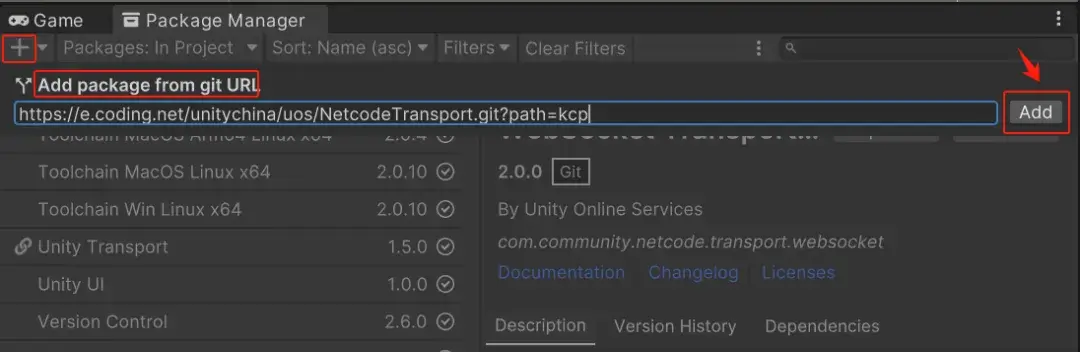
WebSocket Transport for Netcode for GameObjects 资源包的
https://cnb.cool/unity/uos/NetcodeTransport?path=websocket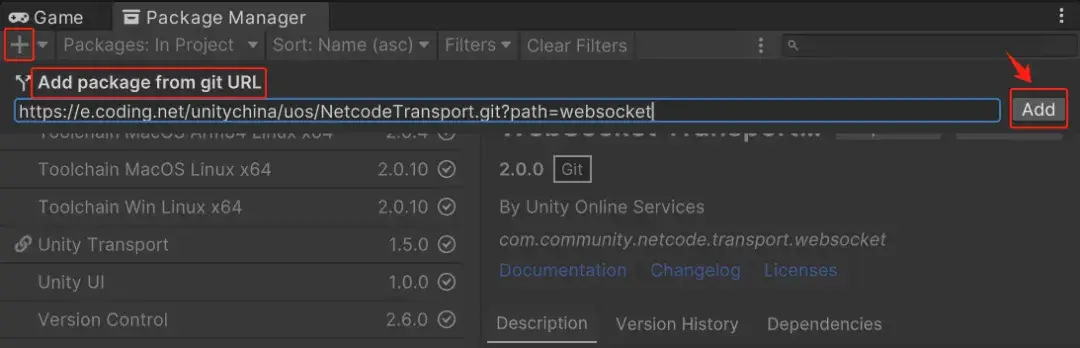
2. 使用
以 KCP 为例,找到场景中有添加 NetworkManager 的对象,给其添加 Kcp 2k Transport 协议脚本组件,同时将 NetworkManager 组件上的 NetworkTransport 参数选择的协议修改为:Kcp 2k Transport 协议 。