
Allocation
Allocation
Allocation API 用于创建,查看以及删除服务。
授权
使用 Basic Authorization 来进行鉴权 (推荐服务器端程序使用). 步骤如下:
在 UOS 网站上获取当前需要使用的 UOS APP 的 AppId 和 AppServiceSecret
注:此处 AppId 和 AppServiceSecret,可在 UOS 网站上获取


在请求任意 API 的 Request Header 中增加 Header:
- Authorization: Basic base64(appId:appServiceSecret)
示例代码
C## C# 使用示例 - Basic 授权方式 using System; using System.Collections.Generic; using System.Net.Http; using System.Security.Cryptography; using System.Text; using System.Threading.Tasks; using Newtonsoft.Json; class Program { private static string GetBasicAuthorization(string appId, string appServiceSecret) { string credentials = $"{appId}:{appServiceSecret}"; byte[] credentialsBytes = Encoding.UTF8.GetBytes(credentials); string encodedCredentials = Convert.ToBase64String(credentialsBytes); return $"Basic {encodedCredentials}"; } public static async Task Main(string[] args) { using (HttpClient client = new HttpClient()) { // 使用项目的 APP_ID, APP_SERVICE_SECRET 获取 headers client.DefaultRequestHeaders.Add("Authorization", GetBasicAuthorization(APP_ID, APP_SERVICE_SECRET)); // 以get方法为例,替换 url 为你需要请求的 url HttpResponseMessage response = await client.GetAsync(url); response.EnsureSuccessStatusCode(); // 其他处理…… } } }Python# Python 使用示例 - Basic 授权方式 import base64 import requests def get_basic_authorization(app_id, app_service_secret): """ 获取basic auth的Header """ credentials = f'{app_id}:{app_service_secret}' encoded_credentials = base64.b64encode(credentials.encode("utf-8")).decode("utf-8") return {'Authorization': f'Basic {encoded_credentials}'} # 使用 APP_ID, APP_SERVICE_SECRET 获取Basic Token Header headers = get_basic_authorization(APP_ID, APP_SERVICE_SECRET) # 以get方法为例,替换 url 为你需要请求的 url response = requests.get(url, headers=headers)JavaScript// JavaScript 使用示例 - Basic 授权方式 const axios = require('axios'); function getBasicAuthorization(appId, appServiceSecret) { /** 获取 basic auth 的 Header */ const credentials = `${appId}:${appServiceSecret}`; const encodedCredentials = btoa(credentials); return { 'Authorization': `Basic ${encodedCredentials}` }; } // 使用 APP_ID, APP_SERVICE_SECRET 获取Basic Token Header const headers = getBasicAuthorization(APP_ID, APP_SERVICE_SECRET); // 以get方法为例,替换 url 为你需要请求的 url const response = await axios.get(url, { headers });Go// Go 使用示例 - Basic 授权方式 import ( "bytes" "encoding/base64" "encoding/json" "fmt" "io" "net/http" ) func GetBasicAuthorization(appID, appServiceSecret string) string { credentials := appID + ":" + appServiceSecret encodedCredentials := base64.StdEncoding.EncodeToString([]byte(credentials)) return "Basic " + encodedCredentials } func main() { // 以get方法为例,替换 url 为你需要请求的 url req, err := http.NewRequest("GET", url, nil) if err != nil { return nil, err } // 使用 APP_ID, APP_SERVICE_SECRET 获取Basic Token Header req.Header.Set("Authorization", GetBasicAuthorization(APP_ID, APP_SERVICE_SECRET)) client := &http.Client{} response, err := client.Do(req) if err != nil { return nil, err } defer resp.Body.Close() // ……其他处理 }
API 列表
创建 Allocation
在指定APP,指定启动配置和指定区域下分配一个服务。
基本信息
| URL | Method | Content-Type |
|---|---|---|
https://multiverse.scaling.unity.cn/v1/allocation/games/{appId}/allocations | POST | application/json |
Request Body
{
  "uuid": "string",
  "profileId": "string",
  "regionId": "string",
  "envs": {
    "foo": "bar"
  },
  "allocationTTL": "1h"
}
Body参数
| 参数名 | 描述 | 类型 | 必填 |
|---|---|---|---|
| uuid | 用于识别该分配的UUID, 这个UUID由服务开发者生成, 用于之后调取服务分配的细节或移除分配, 请注意:这必须是一个正确的UUID。 | String | 是 |
| profileId | 待分配服务所属的 profileId | String | 是 |
| regionId | 待分配服务所属的 regionId | String | 是 |
| allocationTTL | 服务器超时时长(默认1小时) | String | 否 |
| envs | 传递给服务的变量 | map<string, string> | 否 |
注:此处 profileId 和 regionId,可在 UOS 网站上获取
profileId
regionId
输出示例
{
  "allocation": {
    "uuid": "string",
    "gameId": "string",
    "profileId": "string",
    "regionId": "string",
    "ip": "string",
    "gameServerPorts": [
      {
        "port": 9998,
        "protocol": "UDP",
        "name": "rest"
      }
    ],
    "gameServerName": "string",
    "createdAt": "2023-01-04T03:06:13.107Z",
    "createdByUser": "string",
    "modifiedAt": "2023-01-04T03:06:13.107Z",
    "modifiedByUser": "string",
    "fulfilledAt": "2023-01-04T03:06:13.107Z",
    "deletedAt": "2023-01-04T03:06:13.107Z",
    "deletedByUser": "string",
    "status": "string",
    "msg": "string",
    "allocationTTL": "string",
    "profileName": "string",
    "regionName": "string"
  }
}
配置 Allocation callback url
可在创建/更新App的时候配置 allocationCallbackUrl (需支持 http post method)。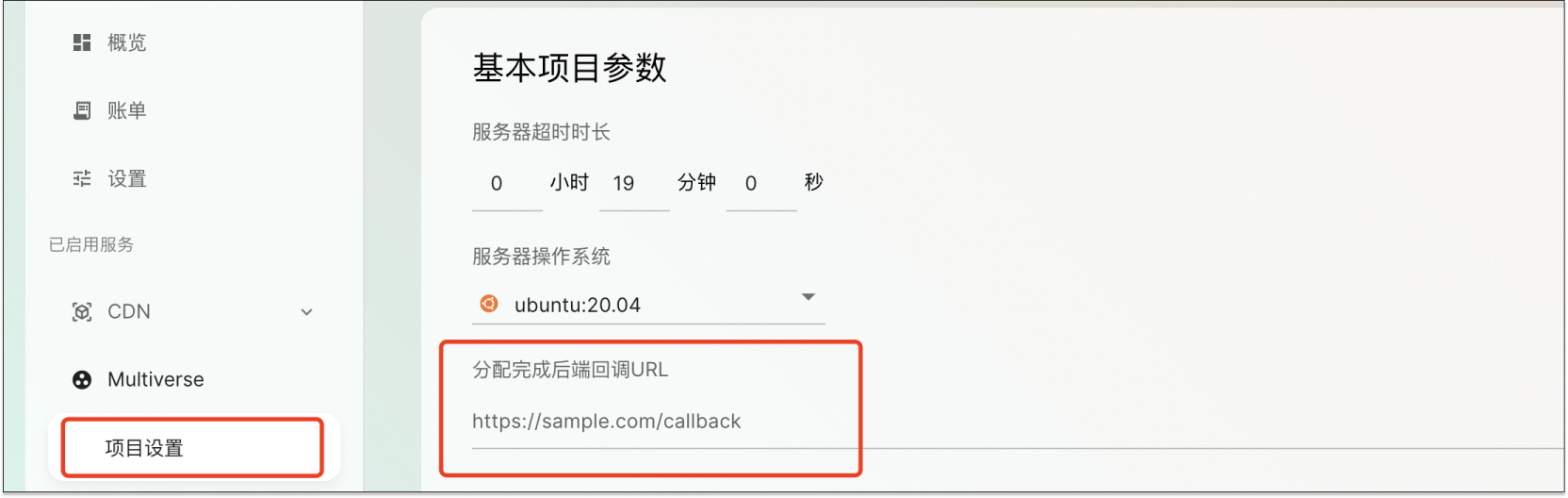
一旦你配置了allocationCallbackUrl,分配完成时,就会回调你配置的 allocationCallbackUrl, 将 allocation 信息发送过去。
{
  "description": {
    "uuid": "allocation uuid(用于识别该分配的UUID)",
    "ip": "分配的服务器ip地址",
    "gameServerPorts": "分配的服务器端口信息(格式:端口号/协议/用途)",
    "status": "分配状态,仅支持 allocated(成功)或 failed(失败)",
    "msg": "分配失败的原因(状态为 allocated 时可省略或为空)",
    "uosAppId": "UosApp ID(关联的应用标识)",
    "profileId": "启动配置ID(待分配服务所属的配置标识)",
    "regionId": "地域ID(待分配服务所属的地域标识)"
  },
  "uuid": "f7e74be7-1fd2-4f59-a84c-05fce8959a02",
  "ip": "101.43.43.8",
  "gameServerPorts": [
    "7275/UDP/http",
    "7352/TCP/grpc"
  ],
  "status": "...",
  "msg": "...",
  "uosAppId": "c5c1506c-a400-49a8-892a-bb63a4030427",
  "profileId": "7ed7d79a-7337-4079-93e2-ab0b8c60c153",
  "regionId": "27410428-5d54-41f8-bd52-faf2adddcda0"
}
查询 Allocation
根据请求参数获取指定的 Allocation 列表信息。
| URL | Method |
|---|---|
https://multiverse.scaling.unity.cn/v1/allocation/games/{appId}/allocations/{uuid} | GET |
输出示例
{
  "allocation": {
    "uuid": "string",
    "gameId": "string",
    "profileId": "string",
    "regionId": "string",
    "ip": "string",
    "gameServerPorts": [
      {
        "port": 9998,
        "protocol": "UDP",
        "name": "rest"
      }
    ],
    "gameServerName": "string",
    "createdAt": "2023-05-08T10:00:51.797Z",
    "createdByUser": "string",
    "modifiedAt": "2023-05-08T10:00:51.797Z",
    "modifiedByUser": "string",
    "fulfilledAt": "2023-05-08T10:00:51.797Z",
    "deletedAt": "2023-05-08T10:00:51.797Z",
    "deletedByUser": "string",
    "status": "string",
    "msg": "string",
    "allocationTTL": "string",
    "regionName": "string",
    "profileName": "string"
  }
}
删除 Allocation
删除指定APP下的指定 Allocation。
基本信息
| URL | Method |
|---|---|
https://multiverse.scaling.unity.cn/v1/allocation/games/{appId}/allocations/{uuid} | DELETE |
输出示例
{
  "deletedAt": "2023-01-03T13:59:15.540Z",
  "deletedByUser": "string"
}